Heim > Teachers > Grades and Feedback > Rubrics > Adding a Rubric to an Assignment, Discussion, or Quiz

Adding a Rubric to an Assignment, Discussion, or Quiz

Rubric Settings

The same rubric can be used in more than one assignment or course, with different settings depending on the context.

After a rubric has been added to an assignment, you can choose how it will function in that assignment. Click the pencil icon in the upper-right corner of the rubric to open the settings.
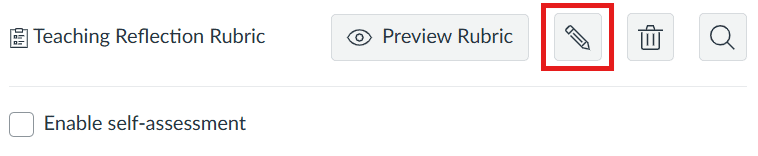
rubric-settings
By enabling Self Assessment, students can use the rubric to assess their own work.

If the assignment grade should be calculated from the rubric score, select Use this rubric for assignment grading and make sure the total points in the rubric match the points set for the assignment.choose rubric settings
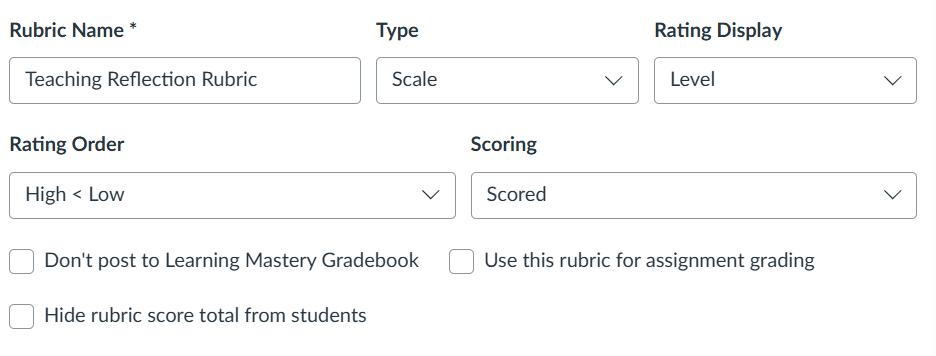
Access to Rubrics

A teacher always has access to all of their rubrics. This makes it easy to reuse rubrics across courses.

Student Access to a Rubric

A rubric that has been added to an assignment is visible to students as long as the assignment has been published.

FeedbackFruits
Please note that rubrics in FeedbackFruits are not visible to students until they need to use the rubric themselves, for example in peer review, or when they receive a grade and feedback on a FeedbackFruits assignment.