Heim > Home > Teachers > Course Basics > Syllabus

Syllabus in Canvas

Purpose

The syllabus is a guide that helps students understand what they are expected to learn, how teaching and assessment are organised, and what is expected of them in the course.

It also helps teachers plan the course in a clear and consistent way so that learning outcomes, teaching methods, and assessment are aligned. A well-designed syllabus increases transparency, reduces uncertainty, and supports purposeful and effective learning. It is also important that students can always find the syllabus in the same place in all their courses, in the course navigation menu. In Canvas, the Syllabus page is a course navigation item and can be used as the course home page.

Features

Click Edit at the top of the syllabus page to add content. Teachers can use the full Rich Content Editor, for example to create links to course content, embed video, or record a welcome message.

The following items appear automatically on the syllabus page:

  • a list of course assignments in date order
  • information about weighted assignment groups
  • the course calendar

It is recommended to add syllabus content directly in the editor rather than sharing it as a separate document.

This has several advantages:

  • The content is more accessible, and the text adapts better to different screen sizes.

  • This is especially important for students who use screen readers or other assistive technology, but it is also more user-friendly for everyone.

  • Many students use smartphones to access Canvas.

  • It is much quicker and easier for the teacher to update the content, for example, to correct a typing error or change a date.

Instead of locating the original file, opening it in another program, editing it, saving it, uploading it again, and possibly recreating links, the teacher can simply edit and save the content in Canvas.

It is also a good idea to review what content should be included in a syllabus.

The syllabus page in Canvas

The syllabus page in Canvas has three main parts:

  1. Syllabus content
    This area displays the content added by the teacher. Here you can use the full editor to create links to assignments, files, and other course materials, embed video, or record a message for students.
  2. Course summary
    This area automatically displays a list of graded assignments, discussions, and quizzes in chronological order by due date.
  3. Calendar and weighting
    On the right-hand side, the course calendar is displayed together with the weighting of assessment groups in the final course grade.
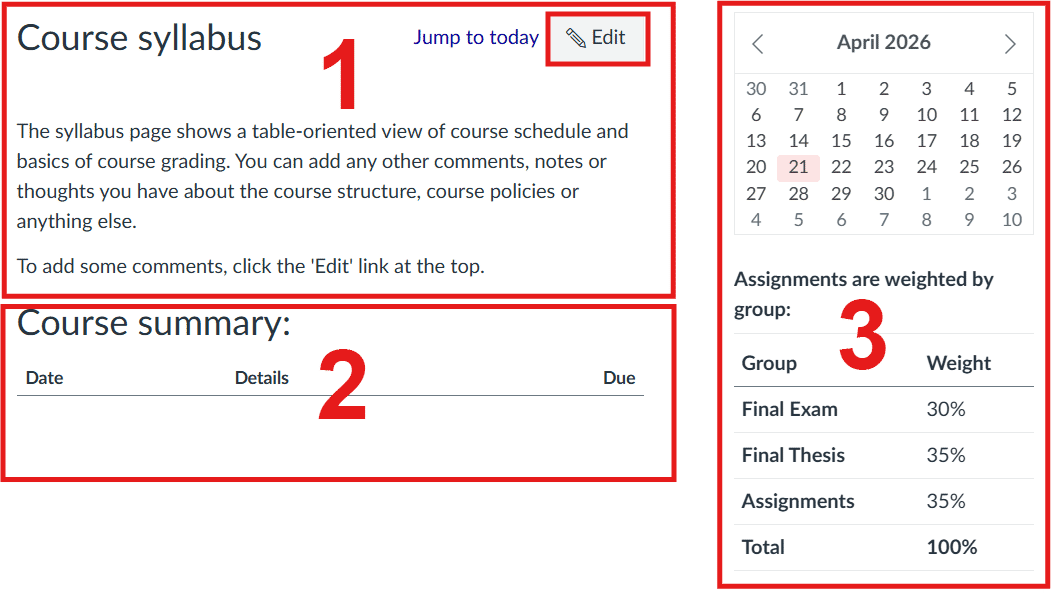
syllbus sections

Related resources